Hatchlog: a Backlog.md alternative with a native Mac board
Backlog.md is a free, MIT-licensed task tool that keeps every task as Markdown in your Git repo and gives you a Kanban board in the terminal and a local web UI. Agents connect over MCP or a CLI file. Hatchlog is a native Mac alternative: a board the agent keeps current, with per-task token cost for Claude Code. Choose Backlog.md to stay free and in-repo; choose Hatchlog for a Mac app with cost.
This is an honest comparison from the person who makes Hatchlog. Backlog.md is a well-built tool, and for a free, in-repo workflow it’s one of the best options going. Here’s where each one fits.
What Backlog.md does well
Backlog.md keeps every task as a plain Markdown file in your Git repo, so your plan versions with your code and needs no server or account. It’s more than files, though: backlog board paints a live Kanban board in your terminal, and backlog browser serves a local web board with drag-and-drop and editing. Agents connect over MCP or a short CLI-instructions file, so Claude Code, Codex, Cursor and Gemini CLI all work. It’s free and open source under MIT, and cross-platform.
If you want a board without leaving the repo, and you want it free and local, this is the one I’d try before anything paid. For how Backlog.md compares to the plainer file approach, see Task Master.
| Hatchlog | Backlog.md | |
|---|---|---|
| Price model | One-time purchase, from $6 | Free; open source (MIT) |
| Platforms | Native Mac app | Cross-platform CLI (npm, Homebrew, Nix) |
| Local or cloud | Local; your projects stay on your Mac | Local; Markdown task files in your Git repo |
| Agents supported | Claude Code, Cursor, Codex, Claude Desktop | Claude Code, Codex, Cursor, Gemini CLI via MCP or CLI |
| Board UI | Native board the agent keeps up to date | Terminal Kanban plus a local web board |
| Token cost tracking | Per-task token cost, for Claude Code | No per-task token cost tracking |
| Setup | Connect agents in one click | Install, run `backlog init`, pick MCP or CLI rules |
Where Hatchlog is different
Backlog.md and Hatchlog agree on a lot: local, private, a board the agent can drive. The differences are the platform, who keeps the board current, and cost.
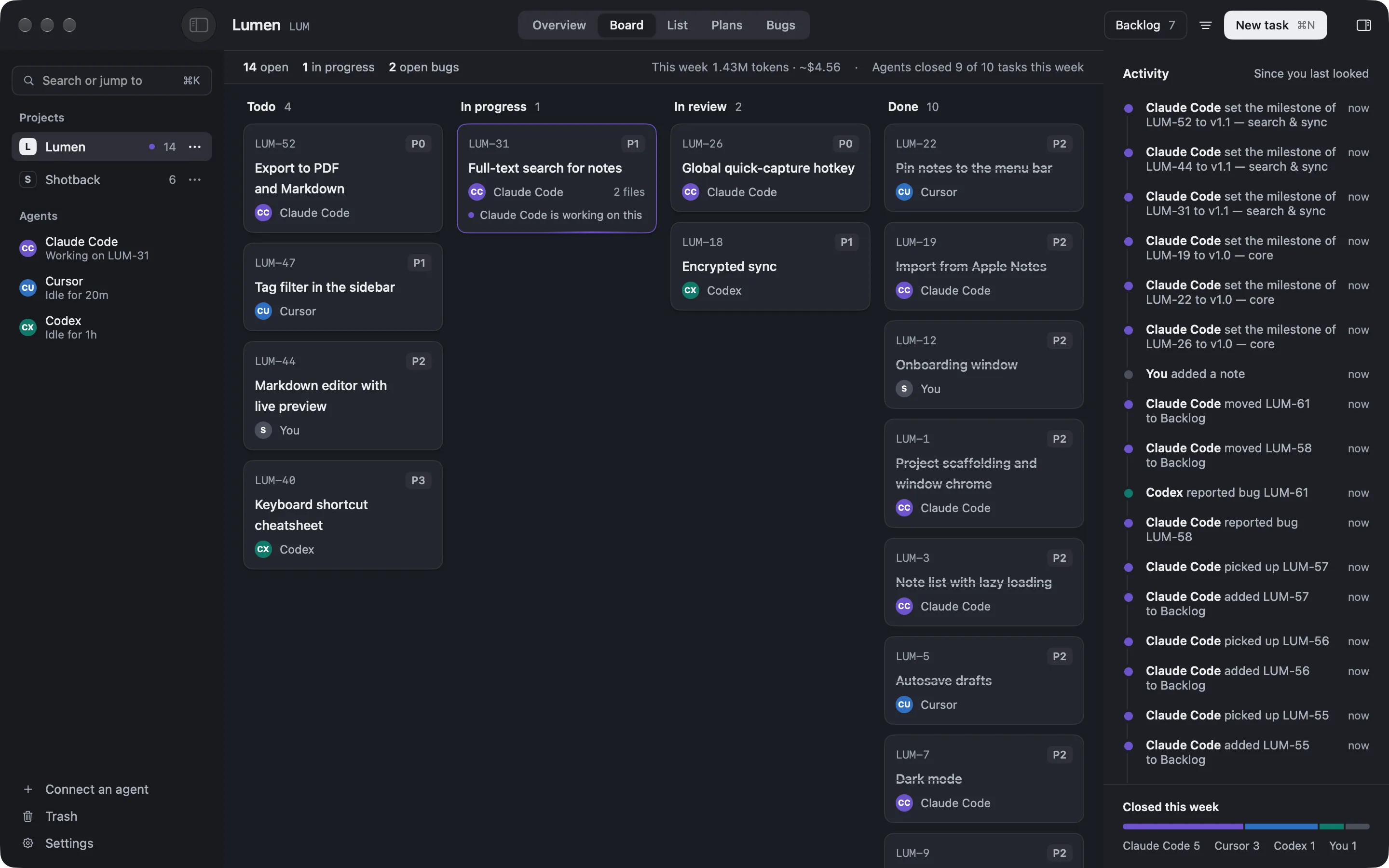
A native Mac app, not a terminal or browser tab. Backlog.md’s boards live in your shell or a local web page. Hatchlog is a Mac window with the board as the app.
The agent keeps it current without a command. On Backlog.md you prefer its CLI or MCP calls over hand-editing files to keep fields consistent. On the Hatchlog board, the agent writes back what changed as it works.
It shows what the work cost. Hatchlog measures the Claude Code tokens each task spent and the API-equivalent cost. Backlog.md doesn’t track per-task cost.
Honest trade-offs
Hatchlog is Mac-only and paid. Backlog.md is free, cross-platform, and keeps your tasks as files you fully own in the repo. If you’re on Windows or Linux, or you want your task list to live in Git with your code, Backlog.md is the better fit, and it costs nothing.
Choose Backlog.md if…
- You want a free, open-source tool with tasks as Markdown in your repo.
- You work on Windows or Linux, or across machines.
- You’re happy running a board in the terminal or a local web page.
Choose Hatchlog if…
- You’re on a Mac and want the board to be a native app.
- You’d rather the agent keep the board current than keep fields tidy yourself.
- You want to know what each feature cost in Claude Code tokens.
For the full field, see the best task managers for AI coding agents. The free-first approach is in keeping Claude Code on track across sessions.
FAQ
Is Backlog.md free?
Yes. It's open source under the MIT license. Hatchlog is a one-time purchase, not a subscription.
Does Backlog.md have a board?
Yes, two. `backlog board` draws a Kanban board in your terminal, and `backlog browser` serves a local web board with drag-and-drop. Hatchlog's board is a native Mac window the agent updates itself.
Where do the tasks live?
In Backlog.md, every task is a Markdown file in your Git repo, so they version with your code. Hatchlog keeps task state in the app on your Mac; your code and projects stay local too.
Which one shows token cost?
Only Hatchlog, and only for Claude Code. Backlog.md doesn't track per-task cost.