How to see what each feature cost in Claude Code tokens
Claude Code shows token usage per run, not per feature. Its free /usage command, ccusage and OpenTelemetry export all report by session, day or model, so none of them groups spend by feature or task. To get cost per feature, tie the tokens to a task: Hatchlog's Tokens block shows what each task spent, or you can put a run's token counts into the cost calculator.
Why “per feature” is the hard part
Claude Code can show what a run used in tokens. What it can’t tell you on its own is what a feature cost, because a feature is usually several runs across a few sessions, and the usage isn’t grouped that way.
So the job is to tie tokens to the unit you care about: the task or the feature. Once the tokens hang off a task, “what did this cost” becomes a number you can read instead of a guess.
The free ways first
Before any paid tool, three free ones tell you something about spend. Each is useful, and each stops short of per-feature cost.
The /usage command
Type /usage in a session and the Session block shows that session’s token usage and a dollar figure. On an API account the figure is an estimate, computed locally at list price; the Claude Console is the authoritative bill. On a Pro or Max subscription the session cost isn’t relevant for billing, so you see plan usage bars and activity stats instead. Either way it is per session, and it resets on /clear.
ccusage
ccusage is a free command-line tool that reads Claude Code’s local log files and reports usage by day, month and session, with 5-hour billing-window blocks. Run it with npx ccusage@latest, then ccusage daily or ccusage session. It answers “what did today cost” well; its unit is the day or the session.
OpenTelemetry export
For teams, set CLAUDE_CODE_ENABLE_TELEMETRY=1 and point Claude Code at a collector, and it emits claude_code.token.usage and claude_code.cost.usage (the cost is an approximation). You can slice those by user, model, skill or subagent on a dashboard.
All three answer “what did I spend” by session, day or model. None answers “what did this feature cost,” because none ties spend to the task you were building. That is the gap the rest of this guide fills.
Four numbers to capture per run
A run bills in four buckets, and you want all four to get the cost right:
- Input and output tokens, the fresh ones.
- Cache write and cache read tokens, from prompt caching.
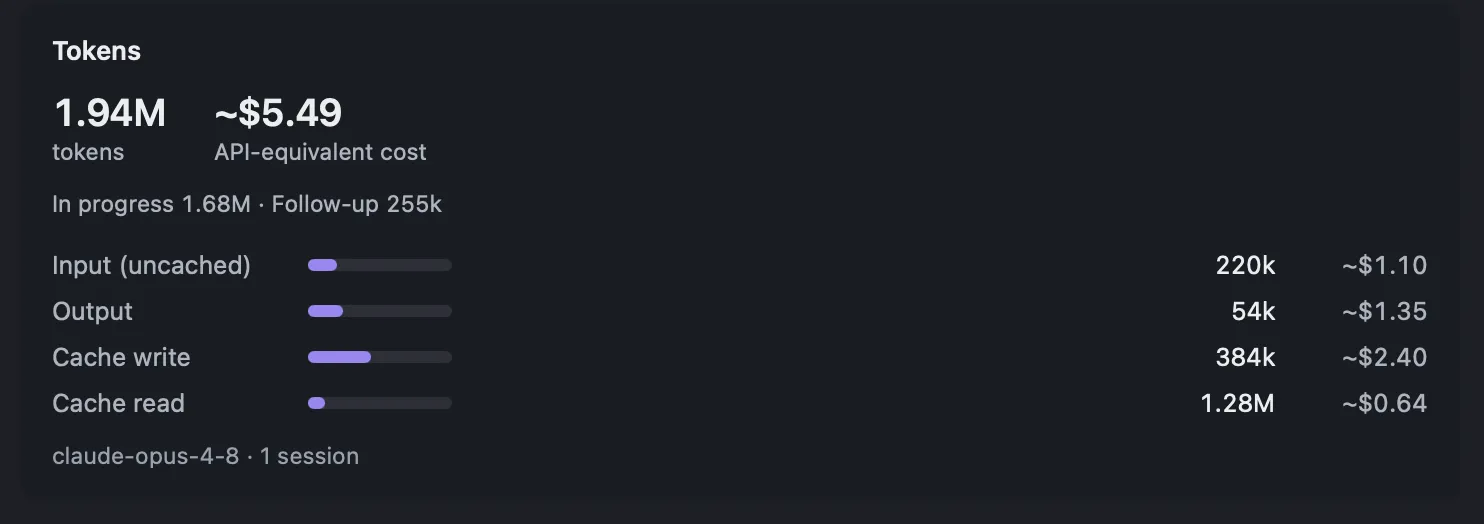
Cache reads usually dominate a long session while barely moving the bill, which is why a feature often costs far less than its raw token count suggests. If you have a run’s four counts, drop them into the cost calculator to get the API-equivalent cost.
Reading it per task in Hatchlog
Hatchlog measures the Claude Code tokens each task spent and shows them on the task’s Tokens block, with the API-equivalent cost beside them. The Overview rolls the same numbers up: the most expensive tasks over a date range, and the cost for the whole project. That’s cost per feature without adding anything up by hand, and without a dashboard to stand up. For what’s measured and what the labels mean, see token cost per task.
Where to get each number
| You want | Where to look |
|---|---|
| This session’s spend | The /usage command |
| Spend by day or week | ccusage |
| Cost of one task or feature | The task’s Tokens block |
| Most expensive tasks over time | The Overview, by date range |
| Cost from a run’s raw counts | The cost calculator |
Token cost is measured for Claude Code only. Cursor and Codex can use the same board, but their work has no cost figure.
FAQ
Can Claude Code tell me the cost of one feature?
Not on its own. The /usage command, ccusage and the OpenTelemetry metrics all report by session, day or model, not by feature. You have to tie those tokens to the feature yourself, or use a board that measures per task.
Is the dollar figure my real bill?
It's the API-equivalent cost: what those tokens would cost at public API prices. If you pay per token it's close to your bill; on a flat plan it's a comparison figure, not an invoice. For the authoritative number, check the Claude Console.
Why is a feature cheaper than its token count looks?
Prompt caching. Most of a long session's input is cache reads, billed at a fraction of the input price, so the bill is far below the raw token count.